

Introduction: The AiTM Extinction Event
For decades this passwordless authentication implementation guide , the cybersecurity industry treated the password as a necessary evil. We tried to fix it with complexity requirements forcing users to remember strings of symbols, numbers, and capital letters. When that failed, we added Multi-Factor Authentication (MFA). We assumed that if a user had a password and a six-digit code from their phone, the enterprise was secure.
In 2026, that assumption is a critical liability.
The rise of Adversary-in-the-Middle (AiTM) proxy frameworks like Evilginx and Modlishka has rendered traditional MFA obsolete. Attackers no longer try to crack your password; they simply proxy your connection to the real login page, intercept your session cookie, and bypass your 2FA completely. If a human can be phished, your network can be breached. The only mathematical defense is to remove the human’s ability to give away the secret entirely.
To survive the modern threat landscape, enterprises must transition to cryptographic identity. This comprehensive, This passwordless authentication implementation guide provides the exact architectural blueprint to deploy FIDO2, WebAuthn, and Passkeys across your organization, permanently neutralizing credential phishing.
The Cryptographic Triad (FIDO2, WebAuthn, CTAP2)
Before building our passwordless authentication implementation guide, we must establish the underlying physics of modern authentication. “Passwordless” does not mean sending a magic link to an email address; that is simply shifting the vulnerability to the inbox. True passwordless relies on asymmetric cryptography defined by the FIDO Alliance.
1. WebAuthn (Web Authentication API) This is the browser-facing protocol. It is a JavaScript API built directly into Chrome, Edge, Safari, and Firefox. It allows the web application (the Relying Party) to ask the user’s device to sign a cryptographic challenge.
2. CTAP2 (Client to Authenticator Protocol) This is how the browser talks to the actual security hardware. Whether it is a USB YubiKey, Apple’s Secure Enclave (FaceID), or Windows Hello (TPM chip), CTAP2 handles the local communication over USB, NFC, or Bluetooth.
3. FIDO2 FIDO2 is simply the overarching term for the combination of WebAuthn and CTAP2. When your passwordless authentication implementation guide mandates FIDO2, you are requiring hardware-backed, asymmetric cryptographic proofs.
The Mechanics of Origin Binding (Why Phishing Fails)
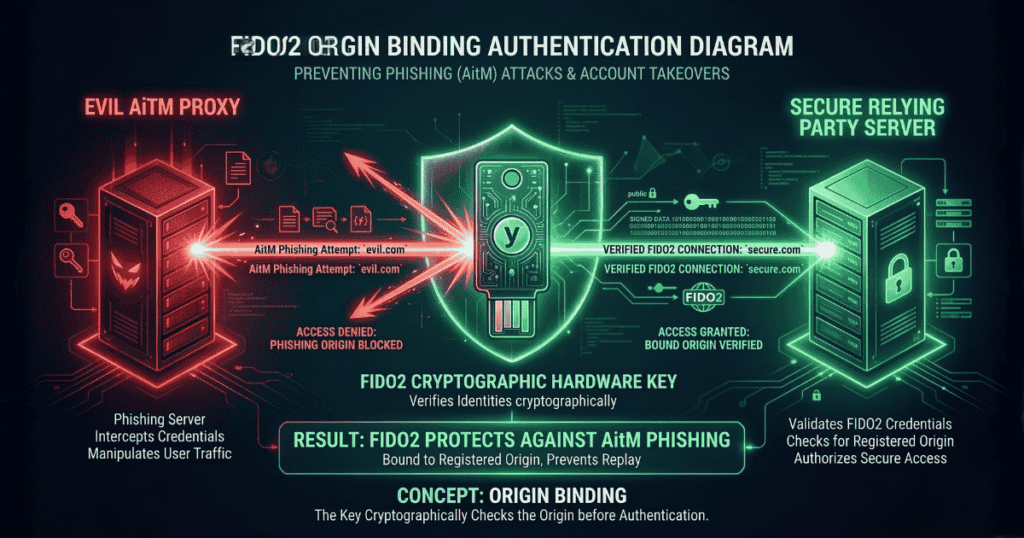
To secure board-level buy-in for your passwordless authentication implementation guide, you must explain exactly why FIDO2 stops AiTM attacks like Evilginx. The secret lies in a concept called Origin Binding.
When a user registers a FIDO2 security key with login.microsoft.com, the browser and the hardware key generate a unique Public/Private key pair specifically for that exact domain string. The private key never leaves the hardware.
The AiTM Attack Scenario:
- An attacker sends a phishing email linking to
login.rnicrosoft.com(notice the ‘r’ and ‘n’). - The user clicks it. The page looks identical to the real Microsoft portal.
- The fake page asks for WebAuthn authentication.
- The browser looks at the domain (
login.rnicrosoft.com) and asks the hardware key to sign the challenge for that domain. - The hardware key checks its vault. It says, “I do not have a private key for
login.rnicrosoft.com. I only have one forlogin.microsoft.com.” - The authentication silently fails. The user cannot be tricked into giving away the credential because the cryptographic hardware refuses to sign the mismatched domain.
Understanding origin binding is the cornerstone of any successful passwordless authentication implementation guide.
Device-Bound vs. Synced Passkeys
In 2026, the term “Passkey” dominates the conversation. Your passwordless authentication implementation guide must differentiate between the two types of passkeys, as they carry different risk profiles.
Synced Passkeys (Consumer/Light Enterprise) Apple, Google, and password managers (like 1Password) offer synced passkeys. The private key is generated on the device but is synchronized across the user’s cloud account (e.g., iCloud Keychain).
- Pros: Incredible user experience. If a user loses their iPhone, they buy a new one, log into iCloud, and their passkeys are instantly restored.
- Cons: If the user’s iCloud account is compromised, the passkeys are compromised.
Device-Bound Passkeys (High-Security Enterprise) These are hardware security keys (like YubiKey 5 Series) or strict MDM-managed TPM chips. The private key is burned into the physical silicon and cannot be extracted or synced.
- Pros: Absolute security. It meets strict compliance frameworks (NIST AAL3).
- Cons: High friction. If the user drops their YubiKey in the ocean, the credential is gone forever, requiring IT helpdesk intervention.
A mature passwordless authentication implementation guide utilizes a hybrid approach: Device-bound keys for Domain Admins and Financial Controllers, and managed synced passkeys for standard frontline workers.
The Core Passwordless Authentication Implementation Guide

Transitioning an enterprise of 5,000 employees off passwords is an operational mountain. Here is the phased passwordless authentication implementation guide required for a zero-downtime migration.
Phase 1: Identity Provider (IdP) Readiness You cannot go passwordless if your infrastructure still speaks legacy protocols.
- Centralize all apps behind Microsoft Entra ID, Okta, or Ping. (Internal Link: Zero Trust Architecture).
- Disable legacy authentication (Basic Auth, IMAP, POP3) globally. If you leave Basic Auth on, attackers will simply bypass your WebAuthn controls by connecting via old email protocols.
Phase 2: The Recovery Strategy (The Hardest Problem) The most critical failure point in any passwordless authentication implementation guide is the recovery flow. If a user loses their phone and YubiKey, how do they get back in?
- The Zero-Trust Initiation: The user reports the lost device via a dedicated, unauthenticated portal or calls a specific IT hotline. The user’s status is immediately flagged as “High Risk.”
- Automated Account Freeze: The IdP automatically suspends the user’s active session tokens to ensure the lost hardware cannot be used if found by a malicious actor.
- Mandatory Video Verification (IDV): The helpdesk initiates a mandatory video call with the user. Voice-only calls or email requests are strictly prohibited.
- Visual Cross-Referencing: On the video call, the IT agent compares the user’s face to their official HR badge photo on file. The user must also hold up a government-issued ID to the camera.
- Managerial Authorization: For highly privileged users (Domain Admins, C-Suite), a secondary approval must be routed to their direct manager in the HR system before proceeding.
- Temporary Access Pass (TAP) Generation: The IT agent generates a TAP within the Identity Provider (like Entra ID). This pass is strictly configured to be valid for only one hour and for one-time use.
- Out-of-Band Delivery: The TAP is never sent to the user’s personal email or SMS. It is verbally read to the user over the video call, or sent securely to the user’s manager, who then provides it to the user in person.
- The Registration Gateway: The user logs in with the TAP. The IdP policy recognizes this is a TAP login and immediately locks the user into a “Registration Only” portal. They cannot access email or internal apps until they complete the next step.
- Hardware Provisioning: The user registers their new hardware (a new YubiKey or a new smartphone passkey) to their account right there in the portal.
- Cryptographic Revocation: The moment the new key is successfully registered, the IdP permanently deletes the public key of the lost device. The TAP is burned, and normal access is restored.
If you fail to build this operational strictness into your passwordless authentication implementation guide, you are locking the front door with a vault and leaving the back window wide open.
Phase 3: Registration Campaigns Do not force the switch overnight.
- Enable FIDO2 as an option in your IdP.
- Run a targeted campaign allowing tech-savvy “champions” to enroll their Windows Hello or Apple TouchID as their primary sign-in method.
- Monitor the telemetry.
Phase 4: The Enforcement Cut-Over Once 80% of users are enrolled, you flip the switch. In Entra ID, this means configuring Conditional Access Policies to require phishing-resistant MFA for all access, and physically removing the password field from the login screen.
The Red Team & Bug Hunter Perspective (Attacking WebAuthn)

No defense is perfect. If you are auditing a network or participating in a bug bounty program, how do you attack an environment that claims to follow a strict passwordless authentication implementation guide?
The short answer: You do not attack the cryptography. You attack the API logic and the developer’s implementation flaws.
Here is exactly how to test a WebAuthn implementation using Burp Suite Professional or Community Edition.
1. Setting Up the Interception To hunt effectively, you need to see the JSON payload being passed between the browser and the backend server.
- Configure your browser to proxy traffic through Burp Suite (usually
127.0.0.1:8080). - Ensure the Burp CA Certificate is installed so you can decrypt the HTTPS traffic.
- Turn “Intercept” to ON.
2. Hunting for Downgrade Attacks in the API Trigger the login or registration flow on the target application. When Burp intercepts the navigator.credentials.create() (Registration) or navigator.credentials.get() (Authentication) request, look closely at the JSON payload.
You are looking for the authenticatorSelection block. A flawless passwordless authentication implementation guide mandates that developers enforce User Verification (like a PIN or biometric touch).
The Intercepted Request:
JSON
"authenticatorSelection": {
  "authenticatorAttachment": "cross-platform",
  "userVerification": "required"
}
- The Exploit: Modify the request in Burp. Change
"userVerification": "required"to"userVerification": "discouraged". Forward the manipulated packet. - The Impact: If the backend server accepts this downgraded request without throwing a cryptographic validation error, you have just found a critical logic flaw. You proved the application trusts the client-side configuration rather than enforcing backend policies.
3. Bypassing Cryptographic Signature Validation The most catastrophic flaw a developer can make when following a passwordless authentication implementation guide is failing to actually verify the cryptographic signature on the server side.
When the hardware key signs the challenge, it sends back an authenticatorData string and a signature.
- The Exploit: Intercept the final authentication POST request going from the browser to the server. Find the
signatureparameter (usually a long Base64 encoded string). - Completely mangle the string. Change the last 10 characters to
AAAAAor delete half of it. Forward the packet. - The Impact: If you are logged in successfully, the backend developer forgot to implement the actual cryptographic math. They are just checking if a signature exists, not if it is valid. This is an immediate, high-severity bug bounty payout.
4. Testing the Origin Binding (RP ID Spoofing) Remember that WebAuthn is bound to the origin domain (Relying Party ID or rpId).
- The Exploit: Intercept the registration payload. If the target is
corp.com, look for"rp": {"id": "corp.com"}. Change it to"rp": {"id": "evil.com"}. - The Impact: If the server registers the credential with the manipulated
rpId, it is fundamentally misconfigured and vulnerable to complex cross-site staging attacks.
By mastering how to intercept and manipulate these payloads in Burp Suite, you can easily expose the cracks in a poorly executed passwordless authentication implementation guide.
Conclusion: Eradicating the Human Factor
Passwords force humans to act as cryptographic storage devices a job we are fundamentally terrible at. By executing this passwordless authentication implementation guide, you relieve your workforce of the burden of security and offload it to the silicon inside their devices.
This is not a theoretical future; it is the baseline requirement for 2026. AiTM phishing attacks will only become more automated, driven by adversarial AI. Implementing a robust passwordless authentication implementation guide is the only mathematical guarantee that when your employees inevitably click a malicious link, your enterprise remains an impenetrable fortress.
For more insights on securing enterprise infrastructure, API hacking, and threat hunting, explore the advanced technical guides on oxofel.com.